
WhatsApp isa popular messaging service that is already well secured. But the fact is that anybody can have your phone and read all of your chats which you might not
want to share, as there is no security feature for WhatsApp that can protect your conversations.

There are only two ways to protect those conversations.
- Use Parental Control App
- Use WhatsApp locker
Use Parental Control App

Android Parental Control is a free version app that is available on Google Play Store. You will face a screen that will ask you the admin password.
Parental Control app is designed to restrict access to selected Apps:
- Select and filter installed apps
- Overall and individual app restriction
- Automatic restart of the app when phone is rebooted
- Safe Sandbox-only show allowed apps
- Password reminder (emails admin password to the configured email address)
- Automatically launch an allowed app in Sandbox mode
Use WhatsApp Locker
Messenger Lock
 There are two different versions of this tool.
The free version is structured with just necessary features when the paid version app has something more than free version. It will help you to create a pattern for WhatsApp that will be used for WhatsApp security
How To Use it:
- When you open Messenger Lock application for the first time you need to set a pattern password.
- When setting screen opens click on the Enable Lock to turn it on.
- You are done.
- Your WhatsApp is protected and now nobody else can open and see your WhatsApp messages without your permission.
- This app uses Airpush ads for monetization & will show you notification ads & Banner ads.
DOWNLOAD
|
Lock for WhatsApp
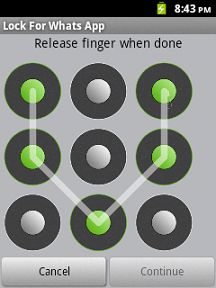 This locking app protect your WhatsApp private chat
- This app is supported via search.
- Please note that the following will be added to your device once you download the app – Search icon, bookmark link and browser homepage. You can delete/replace these search points easily. This is a way to make money from this app and giving it to you for free.
- This app will show you notification, banner, icon ads for monetizing purpose.
Lock For WhatsApp Widget
 This application and widget allows you to block access to WhatsApp. The application only will be accessible if you enter the password correctly.
How to use it:
- Access the application "Block Access WhatsApp" and select the option WhatsApp Blocker Service.
- If you want that access to WhatsApp is restricted long after turning the phone, select "Service Boot"
- Edit and the password! (NOTE: If you do not set any password, the default will be of 123)
- Set lock times if you think that it is appropriate
- Once configured, the access to WhatsApp will be protected.
- Optimized for Android 2.x
If you forget your password:
It will not be a major problem because you are using third party software to lock WhatsApp. You just need to uninstall the app that is creating problems.


